Cursor wants developers to code using phone, iOS app arrives
Cursor has launched its first iPhone and iPad app, bringing AI-powered coding agents to mobile devices. Developers can now start, monitor and review coding tasks on the go, making it easier to continue software development even when they're away from their desks.
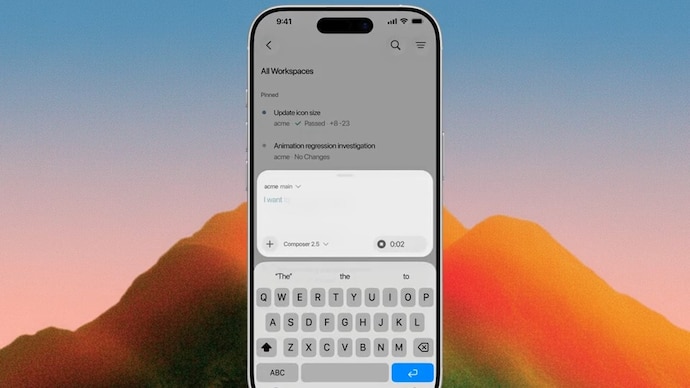
Weeks after its deal with SpaceX, Cursor is bringing AI-assisted software development to smartphones with the launch of its first native iOS app. The company has announced that Cursor for iPhone and iPad is now available in public beta, allowing developers to start, manage and review coding tasks directly from their phones instead of being tied to a desktop.
The iOS release is part of a broader effort by Anysphere, the San Francisco-based company behind Cursor, to make AI coding agents accessible from anywhere. Earlier this month, SpaceX acquired the AI coding startup in a reported $60 billion all-stock deal, with plans to bring Cursor under its xAI subsidiary. Now, with the launch of its official iOS app, Cursor is expanding beyond desktop computers, allowing developers to launch, monitor and review autonomous coding agents even when they are away from their desks.
How the Cursor mobile app works
In its announcement, Cursor highlighted how developers have traditionally depended on local machines, often leaving laptops "half-open and caffeinated" so coding tasks could continue running. With the new mobile app, the company aims to remove this limitation by allowing users to launch AI agents in the cloud, monitor their progress remotely and complete software development tasks from an iPhone or iPad.
The app experience is said to closely mirror Cursor's desktop application. Developers can open the mobile app, choose a repository, select one of the supported AI models and describe what they want the coding agent to do. The app also supports voice input, allowing users to dictate prompts instead of typing them, while slash commands can be used to provide additional instructions to the AI agent.
For developers who already have coding agents running on their computers, Cursor has introduced a feature called Remote Control. This allows users to continue interacting with those agents from their phones without needing to return to their desks. The company has also added an option to keep a computer awake, which ensures it remains accessible while users are away.
According to Cursor, the mobile app is designed for situations where developers need to respond quickly. Whether it's reproducing bugs, reviewing affected code or continuing work on fixes, they can do it all directly from their phones. Cursor also says feedback spotted on platforms such as X can be turned into development tasks by taking a screenshot, annotating it and sending it to an AI agent as visual context for interface or design improvements.
Once an agent is running, users do not need to keep the app open. Live Activities on the iPhone lock screen provide real-time progress updates, while push notifications alert developers when an agent has completed a task, needs additional input or has prepared work for review. Inside the app, developers can inspect code changes, screenshots, logs and demos before approving or merging pull requests.
Meanwhile, Cursor highlights its long-term goal is to make cloud-based AI agents feel no different from working locally. The company is also developing repo-less chat capabilities for tasks that do not require access to a codebase. Cursor for iOS is now available in public beta for all paid subscribers, with the company also offering a limited-time 75 per cent discount on Composer 2.5 runs until July 5.
Weeks after its deal with SpaceX, Cursor is bringing AI-assisted software development to smartphones with the launch of its first native iOS app. The company has announced that Cursor for iPhone and iPad is now available in public beta, allowing developers to start, manage and review coding tasks directly from their phones instead of being tied to a desktop.
The iOS release is part of a broader effort by Anysphere, the San Francisco-based company behind Cursor, to make AI coding agents accessible from anywhere. Earlier this month, SpaceX acquired the AI coding startup in a reported $60 billion all-stock deal, with plans to bring Cursor under its xAI subsidiary. Now, with the launch of its official iOS app, Cursor is expanding beyond desktop computers, allowing developers to launch, monitor and review autonomous coding agents even when they are away from their desks.
How the Cursor mobile app works
In its announcement, Cursor highlighted how developers have traditionally depended on local machines, often leaving laptops "half-open and caffeinated" so coding tasks could continue running. With the new mobile app, the company aims to remove this limitation by allowing users to launch AI agents in the cloud, monitor their progress remotely and complete software development tasks from an iPhone or iPad.
The app experience is said to closely mirror Cursor's desktop application. Developers can open the mobile app, choose a repository, select one of the supported AI models and describe what they want the coding agent to do. The app also supports voice input, allowing users to dictate prompts instead of typing them, while slash commands can be used to provide additional instructions to the AI agent.
For developers who already have coding agents running on their computers, Cursor has introduced a feature called Remote Control. This allows users to continue interacting with those agents from their phones without needing to return to their desks. The company has also added an option to keep a computer awake, which ensures it remains accessible while users are away.
According to Cursor, the mobile app is designed for situations where developers need to respond quickly. Whether it's reproducing bugs, reviewing affected code or continuing work on fixes, they can do it all directly from their phones. Cursor also says feedback spotted on platforms such as X can be turned into development tasks by taking a screenshot, annotating it and sending it to an AI agent as visual context for interface or design improvements.
Once an agent is running, users do not need to keep the app open. Live Activities on the iPhone lock screen provide real-time progress updates, while push notifications alert developers when an agent has completed a task, needs additional input or has prepared work for review. Inside the app, developers can inspect code changes, screenshots, logs and demos before approving or merging pull requests.
Meanwhile, Cursor highlights its long-term goal is to make cloud-based AI agents feel no different from working locally. The company is also developing repo-less chat capabilities for tasks that do not require access to a codebase. Cursor for iOS is now available in public beta for all paid subscribers, with the company also offering a limited-time 75 per cent discount on Composer 2.5 runs until July 5.

