Amazon Fire TV Stick HD review: A simple way to make your TV feel smarter
A smart media player like Fire TV is no longer a kind of necessity in this era of TVs that are natively smart. But it can still offer a fair amount of convenience, or so the India Today Tech finds in this Amazon Fire TV Stick HD review.
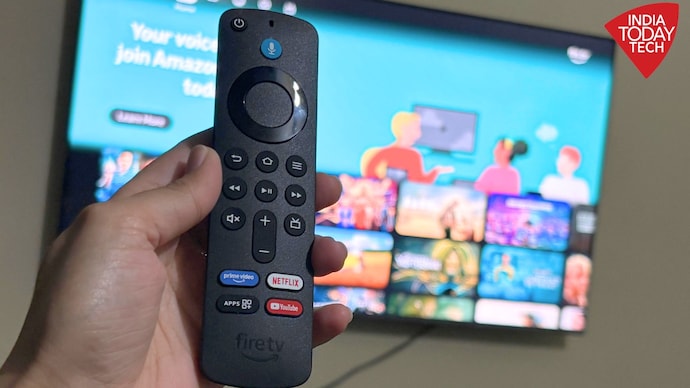
Amazon Fire TV Stick HD review
Pros
- Fast and responsive interface
- Simple setup process
- Compact, easy-to-use Alexa remote
- Makes older TVs feel smarter
Cons
- Ads on home screen
- Can feel pricey
Not every TV ages gracefully. And in some cases, with the RAM shortage impacting everything, even new TVs may seem to have clunkier and slower software. The display of an old TV may still look perfectly fine, the speakers may still do the job, and there may be no real reason to replace it. But in 2026, a TV is about more than just the screen. It also needs to feel smart.
And that is often where things start to feel old. If your software has become outdated, apps take longer to load, navigation has turned sluggish, or if's not a smart TV at all, there are ways to fix it. One such solution is the Amazon Fire TV Stick HD.
Priced at Rs 4,499, the Fire TV Stick HD promises to bring smart features, streaming apps and Alexa voice controls to almost any TV with an HDMI port. On paper, it sounds simple enough: plug it in, sign in and start streaming.
But does it actually improve the experience enough to justify the price? Let’s be honest, Rs 4,499 is not exactly cheap for a streaming stick. The value ultimately depends on what you're looking for and whether the media box — or stick in this case — can solve the problems your TV already has.
I spent some time using the Fire TV Stick HD last few weeks, relying on it for everything from Netflix and Prime Video to YouTube and other streaming services. And while it is not perfect, it quickly reminded me why Amazon continues to sell millions of these small gadgets year after year.
Easy setup
Let's start with the setup experience.
The Fire TV Stick HD is one of those gadgets that does not require a manual. You plug it into an HDMI port, connect the power cable, pair the remote and sign in with your Amazon account.
That's pretty much it.
The entire process is straightforward. Even someone who has never used a streaming device before should be able to get it running without much trouble. Amazon also includes a booklet in the box for anyone who needs a little extra guidance.
The whole process took me only a few minutes. There was no friction, no confusing prompts and no moments where I had to stop and figure out what to do next.
Once the setup was complete, I was ready to start streaming almost immediately.
Performance and interface
Well, the Fire TV Stick HD has one job. It is not about flashy hardware or an endless list of features. It is built to make TV streaming simple and smooth, and for the most part, it delivers exactly what it promises.
Over the years, I have used plenty of smart TVs where the hardware feels capable but the software struggles to keep up. Apps take a second too long to open, menus hesitate before responding and navigation occasionally becomes frustrating.
The Fire TV Stick HD fixes much of that. With the device connected to the TV, apps opened quickly, switching between services felt smooth and scrolling through menus remained responsive throughout my testing. Whether I was jumping between Netflix, Prime Video, YouTube or other streaming platforms, the experience remained consistent.
In fact, after spending time with some slower TV interfaces recently, the difference was immediately noticeable. Everything simply felt quicker and more organised. It worked well, and that is exactly what I expected from a dedicated streaming device.
However, the one thing that chips away at that smoothness is the sheer volume of promotional content on the home screen. Amazon pushes its own recommendations quite aggressively and, while the interface underneath is fast, you are constantly scrolling past banners and suggested titles you did not specifically ask for.
Now, this is hardly unique to Amazon. Most TV platforms do something similar these days. But if I'm paying Rs 4,499 for a dedicated streaming device, seeing ads and promotional content across the home screen is probably the last thing I want. They're not overwhelming, but they're noticeable enough to be mildly annoying.
While I liked using the Fire TV Stick HD, there are few limitations that I also must talk about. Unlike the previous Fire TV Sticks, Amazon has now moved away from Android based Fire OS. Instead, the new streaming stick uses Amazon’s own Vega OS software, which is based on Linux.
This is a very important change and users must be aware of it, because it means you cannot run Android apps on the Fire TV Stick HD. You do not have access to Android Play Store, and neither you can sideload popular Android apps on the Stick. Instead, any app that you need must come from Amazon’s own proprietary app store. This does limit the utility of the Fire TV.
The Full HD limitation
This is another part where you need to make a choice. Amazon sells both the Fire TV Stick HD and the Fire TV Stick 4K, with the latter costing more. If you are connecting the Fire TV Stick HD to an older television, this probably will not matter much.
For those users, the picture quality is perfectly adequate.
However, when paired with a newer and larger television, the limitation becomes easier to notice.
Modern TVs continue to improve in terms of display quality and, once you have experienced good-quality 4K content, dropping back to Full HD can feel like a compromise. The content does not look quite as sharp or detailed, and if you are already used to watching everything in 4K, the difference is noticeable. At the same time, the Fire TV Stick also does not support Dolby Vision. Instead, it renders this high-fidelity content in HDR+. This should not be a deal-breaker — for example, Samsung TVs, even the most premium ones, do not support Dolby Vision — but it is worth knowing.
Overall, the display limitations do not ruin the experience by any means. Streaming remains smooth and enjoyable. But it does leave you wondering whether spending a little extra on the 4K version, for higher-resolution video output, might be the smarter long-term decision.
On the other hand, if you are using it with an older or smaller TV that does not support 4K anyway then HD is all good to go.
Remote and voice control
Let's talk about the Alexa Voice Remote.
The remote is compact, lightweight and easy to use right out of the box. The dedicated TV power and volume buttons worked perfectly during my testing, with no extra setup or pairing headaches. Press the power button and the TV turns on, press the volume controls and they work as expected.
Physically, it is smaller than most smart TV remotes I have used, but that is actually a good thing. It sits comfortably in the hand, the buttons are easy to reach, and navigating through menus is smooth as butter.
Alexa voice search adds another layer of convenience and is where the Fire TV Stick HD feels particularly smart. Instead of typing out long show or movie names using an on-screen keyboard, you can simply ask Alexa to find them. I found myself using Alexa quite a lot to search for content, launch apps and jump directly into shows.
The feature feels familiar, responds quickly and generally understands commands without much fuss. While it is not the main reason to buy the Fire TV Stick HD, it certainly makes the overall experience feel more convenient and modern.
Amazon Fire TV Stick HD review: Should you buy it?
Perhaps the better question is not whether the Fire TV Stick HD is a good streaming device. It is.
The real question is whether you actually need it. If you own an older television that lacks smart features, this device is an easy recommendation. Likewise, if your TV's software feels slow, cluttered or frustrating, the Fire TV Stick HD can genuinely improve the overall experience, albeit be aware of its limitations.
The setup is simple, performance is smooth, Alexa is useful and streaming works exactly as expected.
But if you already own a relatively modern smart TV with decent software, the value proposition becomes less convincing. However, for the right user, the Fire TV Stick HD remains a simple and effective way to make a TV feel smarter and smart TV better.
Not every TV ages gracefully. And in some cases, with the RAM shortage impacting everything, even new TVs may seem to have clunkier and slower software. The display of an old TV may still look perfectly fine, the speakers may still do the job, and there may be no real reason to replace it. But in 2026, a TV is about more than just the screen. It also needs to feel smart.
And that is often where things start to feel old. If your software has become outdated, apps take longer to load, navigation has turned sluggish, or if's not a smart TV at all, there are ways to fix it. One such solution is the Amazon Fire TV Stick HD.
Priced at Rs 4,499, the Fire TV Stick HD promises to bring smart features, streaming apps and Alexa voice controls to almost any TV with an HDMI port. On paper, it sounds simple enough: plug it in, sign in and start streaming.
But does it actually improve the experience enough to justify the price? Let’s be honest, Rs 4,499 is not exactly cheap for a streaming stick. The value ultimately depends on what you're looking for and whether the media box — or stick in this case — can solve the problems your TV already has.
I spent some time using the Fire TV Stick HD last few weeks, relying on it for everything from Netflix and Prime Video to YouTube and other streaming services. And while it is not perfect, it quickly reminded me why Amazon continues to sell millions of these small gadgets year after year.
Easy setup
Let's start with the setup experience.
The Fire TV Stick HD is one of those gadgets that does not require a manual. You plug it into an HDMI port, connect the power cable, pair the remote and sign in with your Amazon account.
That's pretty much it.
The entire process is straightforward. Even someone who has never used a streaming device before should be able to get it running without much trouble. Amazon also includes a booklet in the box for anyone who needs a little extra guidance.
The whole process took me only a few minutes. There was no friction, no confusing prompts and no moments where I had to stop and figure out what to do next.
Once the setup was complete, I was ready to start streaming almost immediately.
Performance and interface
Well, the Fire TV Stick HD has one job. It is not about flashy hardware or an endless list of features. It is built to make TV streaming simple and smooth, and for the most part, it delivers exactly what it promises.
Over the years, I have used plenty of smart TVs where the hardware feels capable but the software struggles to keep up. Apps take a second too long to open, menus hesitate before responding and navigation occasionally becomes frustrating.
The Fire TV Stick HD fixes much of that. With the device connected to the TV, apps opened quickly, switching between services felt smooth and scrolling through menus remained responsive throughout my testing. Whether I was jumping between Netflix, Prime Video, YouTube or other streaming platforms, the experience remained consistent.
In fact, after spending time with some slower TV interfaces recently, the difference was immediately noticeable. Everything simply felt quicker and more organised. It worked well, and that is exactly what I expected from a dedicated streaming device.
However, the one thing that chips away at that smoothness is the sheer volume of promotional content on the home screen. Amazon pushes its own recommendations quite aggressively and, while the interface underneath is fast, you are constantly scrolling past banners and suggested titles you did not specifically ask for.
Now, this is hardly unique to Amazon. Most TV platforms do something similar these days. But if I'm paying Rs 4,499 for a dedicated streaming device, seeing ads and promotional content across the home screen is probably the last thing I want. They're not overwhelming, but they're noticeable enough to be mildly annoying.
While I liked using the Fire TV Stick HD, there are few limitations that I also must talk about. Unlike the previous Fire TV Sticks, Amazon has now moved away from Android based Fire OS. Instead, the new streaming stick uses Amazon’s own Vega OS software, which is based on Linux.
This is a very important change and users must be aware of it, because it means you cannot run Android apps on the Fire TV Stick HD. You do not have access to Android Play Store, and neither you can sideload popular Android apps on the Stick. Instead, any app that you need must come from Amazon’s own proprietary app store. This does limit the utility of the Fire TV.
The Full HD limitation
This is another part where you need to make a choice. Amazon sells both the Fire TV Stick HD and the Fire TV Stick 4K, with the latter costing more. If you are connecting the Fire TV Stick HD to an older television, this probably will not matter much.
For those users, the picture quality is perfectly adequate.
However, when paired with a newer and larger television, the limitation becomes easier to notice.
Modern TVs continue to improve in terms of display quality and, once you have experienced good-quality 4K content, dropping back to Full HD can feel like a compromise. The content does not look quite as sharp or detailed, and if you are already used to watching everything in 4K, the difference is noticeable. At the same time, the Fire TV Stick also does not support Dolby Vision. Instead, it renders this high-fidelity content in HDR+. This should not be a deal-breaker — for example, Samsung TVs, even the most premium ones, do not support Dolby Vision — but it is worth knowing.
Overall, the display limitations do not ruin the experience by any means. Streaming remains smooth and enjoyable. But it does leave you wondering whether spending a little extra on the 4K version, for higher-resolution video output, might be the smarter long-term decision.
On the other hand, if you are using it with an older or smaller TV that does not support 4K anyway then HD is all good to go.
Remote and voice control
Let's talk about the Alexa Voice Remote.
The remote is compact, lightweight and easy to use right out of the box. The dedicated TV power and volume buttons worked perfectly during my testing, with no extra setup or pairing headaches. Press the power button and the TV turns on, press the volume controls and they work as expected.
Physically, it is smaller than most smart TV remotes I have used, but that is actually a good thing. It sits comfortably in the hand, the buttons are easy to reach, and navigating through menus is smooth as butter.
Alexa voice search adds another layer of convenience and is where the Fire TV Stick HD feels particularly smart. Instead of typing out long show or movie names using an on-screen keyboard, you can simply ask Alexa to find them. I found myself using Alexa quite a lot to search for content, launch apps and jump directly into shows.
The feature feels familiar, responds quickly and generally understands commands without much fuss. While it is not the main reason to buy the Fire TV Stick HD, it certainly makes the overall experience feel more convenient and modern.
Amazon Fire TV Stick HD review: Should you buy it?
Perhaps the better question is not whether the Fire TV Stick HD is a good streaming device. It is.
The real question is whether you actually need it. If you own an older television that lacks smart features, this device is an easy recommendation. Likewise, if your TV's software feels slow, cluttered or frustrating, the Fire TV Stick HD can genuinely improve the overall experience, albeit be aware of its limitations.
The setup is simple, performance is smooth, Alexa is useful and streaming works exactly as expected.
But if you already own a relatively modern smart TV with decent software, the value proposition becomes less convincing. However, for the right user, the Fire TV Stick HD remains a simple and effective way to make a TV feel smarter and smart TV better.

