HP OmniBook 5 review: Lightweight, big battery and built for getting work done
The latest OmniBook 5 laptop from HP has a lightweight design and delivers strong everyday performance. At a time when laptop prices are going through the roof, should you spend your money on the OmniBook 5? Read on in this India Today Tech review.
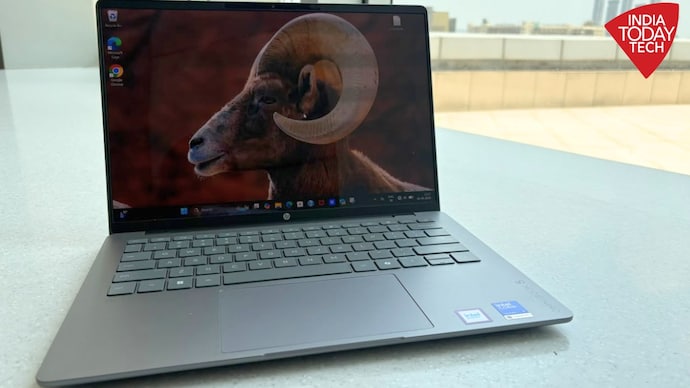
HP OmniBook 5 review
Pros
- Lightweight design
- Strong everyday performance
- Excellent battery life
- Good port selection
Cons
- Screen is reflective
- Hinge could have been sturdier
AI here, AI there, AI-AI everywhere. For laptop makers, “AI PC” is the new marketing buzzword. Almost every premium laptop now carries the AI PC tag, promising a machine that's ready to handle all your AI workloads. HP is no different. Its latest OmniBook 5 comes with Intel's Core Ultra 7 processor with a dedicated NPU theoretically capable of delivering up to 49 TOPS of AI performance. On paper, it certainly sounds like a laptop that's ready to run today's AI features as well those expected to arrive soon.
The OmniBook 5 is not a one-trick pony though. AI is great but HP did not skimp on basics, which is what most people would be buying this laptop for. What are those basics? Well, the design and build quality seems respectable for one. Performance is more than adequate for daily use. Battery life is good. So on and so forth.
But here’s the thing, these are very interesting times. The prices of laptops, and other gadgets, are going up and up, due to surge in component pricing on account of limited availability. Buying a laptop has always been an investment, for most Indian anyway, and so, the question to answer is if the OmniBook 5, is for the lack of a better word, a sound investment at this point in time. Here at India Today Tech, we have spent some quality time with this new laptop, and we think that we might have the answer.
Design: Slim and lightweight
The HP OmniBook 5 has an understated design. For HP loyalists, things might seem familiar. HP sent us the Meteor Silver colour option for review. It screams business casual. The laptop looks clean and minimal. The aluminum finish adds a dash of premium while also giving it a solid feel.
At 13.6 mm and 1.33 kg, you can say that this is a slim and lightweight laptop. In the real world, it is quite easy to carry around, even in your hands. The chassis resists fingerprints well. The hinge is however a bit flimsy. The lid, also, has a bit of flex which is what you might notice when opening/closing or adjusting the screen. It is not a deal breaker but still something to keep in mind. We’ve seen sturdier builds.
Talking about the ports, the selection is practical. You get Thunderbolt 4 USB-C ports and HDMI on the left, and a USB-A port alongside a 3.5mm headphone jack on the right.
Display: OLED goodness
The 14-inch 2K OLED display is easily one of the biggest highlights of the OmniBook 5.
Whether I was editing images, writing, watching YouTube or catching up on Netflix after work, the display left me pleasantly satisfied. Colours appear rich without looking overly saturated, text looks sharp, and the 1920x1200 resolution paired with the 16:10 aspect ratio feels just right for both work and entertainment. Brightness is generally good indoors. Even in brightly lit office spaces, I rarely struggled to see what was on the screen.
There is a small catch though. OLED displays are notorious for reflections, and the OmniBook 5’s screen is no exception. The glossy panel reflects ambient light quite aggressively, and if you're working near a window or under harsh office lighting, you'll likely find yourself cranking the brightness up or adjusting the screen tilt more often. Just so you know, there are laptops with OLED panels in this price segment that manage reflections better.
Keyboard and touchpad: Comfortable and responsive
As someone who spends most of the day typing, keyboard quality matters a lot to me, and the OmniBook 5 does a good job here.
The backlit keyboard feels comfortable right from the start. The key spacing is generous, the 1.3mm key travel feels satisfying, and during my time with the laptop, I never faced any fatigue, even after typing for long durations. Whether it was writing stories, replying to emails or working on documents for hours, the keyboard remained comfortable throughout.
The large touchpad is equally impressive. Windows gestures work seamlessly, tracking is accurate, and I didn't experience any glitches during my review period. It responded consistently to taps, swipes and multi-finger gestures, making navigation around Windows feel smooth and effortless.
Performance: Strong and reliable
Under the hood, the OmniBook 5 is powered by Intel's Core Ultra 7 355 processor. The chipset is complemented by 16GB of LPDDR5X RAM, Intel integrated graphics and a 1TB SSD. On paper, the specifications look solid, and in real-world use, they mostly live up to expectations.
A typical workday for me involved more than 20 Chrome tabs, the company CMS, Photoshop for editing images, Outlook, WhatsApp, YouTube Music running in the background, and Microsoft Office applications, all at the same time. The laptop handled everything without breaking a sweat.
Throughout my testing, the OmniBook 5 remained consistently responsive. Applications launched quickly and multitasking never felt sluggish. The speakers are loud enough for personal entertainment, dialogue remains clear during movies, and video calls sound crisp. The 1080p IR webcam also works fine during meetings.
In practice, I mainly relied on Windows Copilot AI during my testing. It worked well for quick searches, summarising information, brainstorming ideas and handling a few writing-related tasks. I also tried a handful of other AI tools, and everything ran without any issues.
For your reference, I've also attached the benchmark numbers which back up my real-world experience.
Oh and yes, as for the thermals, even during longer work sessions involving Photoshop, dozens of browser tabs and multiple productivity apps, the laptop stayed remarkably cool and quiet. I rarely heard the fans spin up out of control, and when they did, the noise was subtle enough to disappear into the background.
Heat management is equally impressive. The keyboard deck remained comfortable throughout the day, and I never felt the laptop becoming uncomfortably warm while using it on my lap.
Battery life: Long and consistent
Battery life is where the OmniBook 5 really impressed me.
HP claims up to 21.5 hours of video playback. That number, as always, comes with conditions. In real-world mixed use for me – a combination of writing, browsing, video calls, and some streaming — I consistently got into the 10 to 13-hour range. That is excellent. It means most users will comfortably get through a full workday on a single charge, with room to spare.
Starting with a full charge in the morning, I managed to comfortably get through roughly nine hours of work, with around one-third of the battery still remaining by the end of the day.
Charging is equally convenient. The bundled 65W USB-C GaN charger is compact enough to slip into a backpack, and the laptop took around 2 hours to charge fully.
HP OmniBook 5 verdict: Should you buy it?
The HP OmniBook 5 isn't trying to reinvent the Windows laptop. Instead, it focuses on getting the fundamentals right. And it does it well.
It delivers dependable everyday performance, an excellent OLED display, impressive battery life, a comfortable keyboard and a lightweight design that makes it a reliable and powerful daily work machine.
It does have a few drawbacks, such as the glare on the glossy OLED panel, a flimsy hinge and a design that feels a bit ordinary for this price. At Rs 1,24,999, there's also stiff competition from rivals offering more premium designs or additional features. But if you're looking for a Windows laptop that simply gets the job done without any fuss, the HP OmniBook 5 won't disappoint. For professionals, students and office users looking for a lightweight machine with dependable performance and excellent battery life, the OmniBook 5 is worth considering, even at a price of Rs 1,24,999.
AI here, AI there, AI-AI everywhere. For laptop makers, “AI PC” is the new marketing buzzword. Almost every premium laptop now carries the AI PC tag, promising a machine that's ready to handle all your AI workloads. HP is no different. Its latest OmniBook 5 comes with Intel's Core Ultra 7 processor with a dedicated NPU theoretically capable of delivering up to 49 TOPS of AI performance. On paper, it certainly sounds like a laptop that's ready to run today's AI features as well those expected to arrive soon.
The OmniBook 5 is not a one-trick pony though. AI is great but HP did not skimp on basics, which is what most people would be buying this laptop for. What are those basics? Well, the design and build quality seems respectable for one. Performance is more than adequate for daily use. Battery life is good. So on and so forth.
But here’s the thing, these are very interesting times. The prices of laptops, and other gadgets, are going up and up, due to surge in component pricing on account of limited availability. Buying a laptop has always been an investment, for most Indian anyway, and so, the question to answer is if the OmniBook 5, is for the lack of a better word, a sound investment at this point in time. Here at India Today Tech, we have spent some quality time with this new laptop, and we think that we might have the answer.
Design: Slim and lightweight
The HP OmniBook 5 has an understated design. For HP loyalists, things might seem familiar. HP sent us the Meteor Silver colour option for review. It screams business casual. The laptop looks clean and minimal. The aluminum finish adds a dash of premium while also giving it a solid feel.
At 13.6 mm and 1.33 kg, you can say that this is a slim and lightweight laptop. In the real world, it is quite easy to carry around, even in your hands. The chassis resists fingerprints well. The hinge is however a bit flimsy. The lid, also, has a bit of flex which is what you might notice when opening/closing or adjusting the screen. It is not a deal breaker but still something to keep in mind. We’ve seen sturdier builds.
Talking about the ports, the selection is practical. You get Thunderbolt 4 USB-C ports and HDMI on the left, and a USB-A port alongside a 3.5mm headphone jack on the right.
Display: OLED goodness
The 14-inch 2K OLED display is easily one of the biggest highlights of the OmniBook 5.
Whether I was editing images, writing, watching YouTube or catching up on Netflix after work, the display left me pleasantly satisfied. Colours appear rich without looking overly saturated, text looks sharp, and the 1920x1200 resolution paired with the 16:10 aspect ratio feels just right for both work and entertainment. Brightness is generally good indoors. Even in brightly lit office spaces, I rarely struggled to see what was on the screen.
There is a small catch though. OLED displays are notorious for reflections, and the OmniBook 5’s screen is no exception. The glossy panel reflects ambient light quite aggressively, and if you're working near a window or under harsh office lighting, you'll likely find yourself cranking the brightness up or adjusting the screen tilt more often. Just so you know, there are laptops with OLED panels in this price segment that manage reflections better.
Keyboard and touchpad: Comfortable and responsive
As someone who spends most of the day typing, keyboard quality matters a lot to me, and the OmniBook 5 does a good job here.
The backlit keyboard feels comfortable right from the start. The key spacing is generous, the 1.3mm key travel feels satisfying, and during my time with the laptop, I never faced any fatigue, even after typing for long durations. Whether it was writing stories, replying to emails or working on documents for hours, the keyboard remained comfortable throughout.
The large touchpad is equally impressive. Windows gestures work seamlessly, tracking is accurate, and I didn't experience any glitches during my review period. It responded consistently to taps, swipes and multi-finger gestures, making navigation around Windows feel smooth and effortless.
Performance: Strong and reliable
Under the hood, the OmniBook 5 is powered by Intel's Core Ultra 7 355 processor. The chipset is complemented by 16GB of LPDDR5X RAM, Intel integrated graphics and a 1TB SSD. On paper, the specifications look solid, and in real-world use, they mostly live up to expectations.
A typical workday for me involved more than 20 Chrome tabs, the company CMS, Photoshop for editing images, Outlook, WhatsApp, YouTube Music running in the background, and Microsoft Office applications, all at the same time. The laptop handled everything without breaking a sweat.
Throughout my testing, the OmniBook 5 remained consistently responsive. Applications launched quickly and multitasking never felt sluggish. The speakers are loud enough for personal entertainment, dialogue remains clear during movies, and video calls sound crisp. The 1080p IR webcam also works fine during meetings.
In practice, I mainly relied on Windows Copilot AI during my testing. It worked well for quick searches, summarising information, brainstorming ideas and handling a few writing-related tasks. I also tried a handful of other AI tools, and everything ran without any issues.
For your reference, I've also attached the benchmark numbers which back up my real-world experience.
Oh and yes, as for the thermals, even during longer work sessions involving Photoshop, dozens of browser tabs and multiple productivity apps, the laptop stayed remarkably cool and quiet. I rarely heard the fans spin up out of control, and when they did, the noise was subtle enough to disappear into the background.
Heat management is equally impressive. The keyboard deck remained comfortable throughout the day, and I never felt the laptop becoming uncomfortably warm while using it on my lap.
Battery life: Long and consistent
Battery life is where the OmniBook 5 really impressed me.
HP claims up to 21.5 hours of video playback. That number, as always, comes with conditions. In real-world mixed use for me – a combination of writing, browsing, video calls, and some streaming — I consistently got into the 10 to 13-hour range. That is excellent. It means most users will comfortably get through a full workday on a single charge, with room to spare.
Starting with a full charge in the morning, I managed to comfortably get through roughly nine hours of work, with around one-third of the battery still remaining by the end of the day.
Charging is equally convenient. The bundled 65W USB-C GaN charger is compact enough to slip into a backpack, and the laptop took around 2 hours to charge fully.
HP OmniBook 5 verdict: Should you buy it?
The HP OmniBook 5 isn't trying to reinvent the Windows laptop. Instead, it focuses on getting the fundamentals right. And it does it well.
It delivers dependable everyday performance, an excellent OLED display, impressive battery life, a comfortable keyboard and a lightweight design that makes it a reliable and powerful daily work machine.
It does have a few drawbacks, such as the glare on the glossy OLED panel, a flimsy hinge and a design that feels a bit ordinary for this price. At Rs 1,24,999, there's also stiff competition from rivals offering more premium designs or additional features. But if you're looking for a Windows laptop that simply gets the job done without any fuss, the HP OmniBook 5 won't disappoint. For professionals, students and office users looking for a lightweight machine with dependable performance and excellent battery life, the OmniBook 5 is worth considering, even at a price of Rs 1,24,999.

