How to spot fake QR codes before you scan
As fake QR codes spread across shops, parking areas and online messages, users are being urged to check before scanning. A quick look at the source, link and payment request can help prevent fraud and data theft.
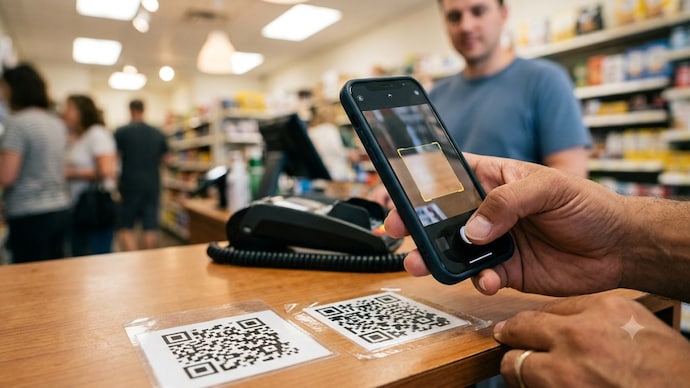
QR codes have become a part of everyday life, from making UPI payments and ordering food to checking into hotels and accessing menus. However, cybercriminals are increasingly using fake QR codes to trick people into sharing personal information or sending money to the wrong account. A few simple checks before scanning can help protect your money and personal data.
WHAT IS A FAKE QR CODE?
A fake QR code is a malicious code designed to redirect users to fraudulent websites, fake payment pages, or phishing links. In some cases, scammers place a fake QR code sticker over a genuine one at shops, parking lots, restaurants, or public places.
CHECK IF THE QR CODE LOOKS TAMPERED
Before scanning, inspect the QR code carefully. If it appears to be a sticker pasted over another code, is peeling at the edges, or looks recently attached, avoid scanning it. Genuine businesses usually display professionally printed QR codes.
VERIFY THE SOURCE
Only scan QR codes from trusted businesses, official websites, or verified organisations. Be cautious of codes shared through unknown messages, emails, or social media posts promising rewards, discounts, or urgent updates.
LOOK AT THE LINK BEFORE OPENING IT
Many smartphones display the website address before opening it. Read the URL carefully. If it contains spelling mistakes, random characters, or an unfamiliar domain name, do not proceed.
NEVER ENTER SENSITIVE INFORMATION
A QR code should not ask you to enter confidential details such as banking passwords, debit or credit card PINs, CVV numbers, or OTPs. If a website requests such information unexpectedly, exit immediately.
BE CAREFUL WITH PAYMENT REQUESTS
Remember that scanning a QR code to receive money is not required. If someone claims you need to scan a QR code to get a refund, salary, or prize, it is almost certainly a scam. Scanning a payment QR code usually initiates a payment from your account.
USE ONLY TRUSTED PAYMENT APPS
Scan payment QR codes only through official banking or trusted UPI apps. Avoid downloading unknown QR scanner apps from unofficial sources, as they may expose your data.
CHECK FOR HTTPS AND SECURITY
If the QR code opens a website, ensure the address begins with https:// and shows a secure connection. While this alone does not guarantee safety, it is an important security indicator.
WATCH OUT FOR URGENT OFFERS
Fraudsters often use messages such as "Scan now to claim your reward," "Limited-time cashback," or "Your account will be blocked." Such urgency is a common tactic to make people act without thinking.
REPORT SUSPICIOUS QR CODES
If you notice a fake or altered QR code at a shop, parking area, or public place, inform the business owner immediately. If you believe you have been targeted by a scam, report it to your bank or payment service provider and file a complaint through the National Cyber Crime Reporting Portal or the cybercrime helpline.
QUICK SAFETY TIPS
- advertisement
Inspect the QR code before scanning.
Scan only from trusted sources.
Verify the website address before clicking.
Never share OTPs, PINs, or passwords.
Use official UPI and banking apps.
Ignore QR codes promising free gifts or instant rewards.
QR codes make digital transactions quick and convenient, but they can also be misused by scammers. Taking a few seconds to verify the code, the source, and the destination link can help you avoid fraud and keep your personal and financial information safe.
QR codes have become a part of everyday life, from making UPI payments and ordering food to checking into hotels and accessing menus. However, cybercriminals are increasingly using fake QR codes to trick people into sharing personal information or sending money to the wrong account. A few simple checks before scanning can help protect your money and personal data.
WHAT IS A FAKE QR CODE?
A fake QR code is a malicious code designed to redirect users to fraudulent websites, fake payment pages, or phishing links. In some cases, scammers place a fake QR code sticker over a genuine one at shops, parking lots, restaurants, or public places.
CHECK IF THE QR CODE LOOKS TAMPERED
Before scanning, inspect the QR code carefully. If it appears to be a sticker pasted over another code, is peeling at the edges, or looks recently attached, avoid scanning it. Genuine businesses usually display professionally printed QR codes.
VERIFY THE SOURCE
Only scan QR codes from trusted businesses, official websites, or verified organisations. Be cautious of codes shared through unknown messages, emails, or social media posts promising rewards, discounts, or urgent updates.
LOOK AT THE LINK BEFORE OPENING IT
Many smartphones display the website address before opening it. Read the URL carefully. If it contains spelling mistakes, random characters, or an unfamiliar domain name, do not proceed.
NEVER ENTER SENSITIVE INFORMATION
A QR code should not ask you to enter confidential details such as banking passwords, debit or credit card PINs, CVV numbers, or OTPs. If a website requests such information unexpectedly, exit immediately.
BE CAREFUL WITH PAYMENT REQUESTS
Remember that scanning a QR code to receive money is not required. If someone claims you need to scan a QR code to get a refund, salary, or prize, it is almost certainly a scam. Scanning a payment QR code usually initiates a payment from your account.
USE ONLY TRUSTED PAYMENT APPS
Scan payment QR codes only through official banking or trusted UPI apps. Avoid downloading unknown QR scanner apps from unofficial sources, as they may expose your data.
CHECK FOR HTTPS AND SECURITY
If the QR code opens a website, ensure the address begins with https:// and shows a secure connection. While this alone does not guarantee safety, it is an important security indicator.
WATCH OUT FOR URGENT OFFERS
Fraudsters often use messages such as "Scan now to claim your reward," "Limited-time cashback," or "Your account will be blocked." Such urgency is a common tactic to make people act without thinking.
REPORT SUSPICIOUS QR CODES
If you notice a fake or altered QR code at a shop, parking area, or public place, inform the business owner immediately. If you believe you have been targeted by a scam, report it to your bank or payment service provider and file a complaint through the National Cyber Crime Reporting Portal or the cybercrime helpline.
QUICK SAFETY TIPS
Inspect the QR code before scanning.
Scan only from trusted sources.
Verify the website address before clicking.
Never share OTPs, PINs, or passwords.
Use official UPI and banking apps.
Ignore QR codes promising free gifts or instant rewards.
QR codes make digital transactions quick and convenient, but they can also be misused by scammers. Taking a few seconds to verify the code, the source, and the destination link can help you avoid fraud and keep your personal and financial information safe.

