Apple starts rolling out iOS 27 public beta, Siri AI is biggest highlight
Apple has now released the iOS 27 public beta, giving you the chance to try out new iOS features on your iPhone, including Siri AI. Here is everything that's new in the iOS 27 beta, and how you can install it.
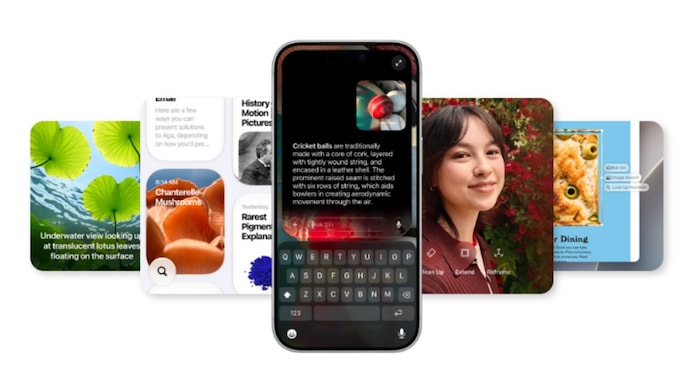
Last month, Apple revealed its latest generation of operating systems at WWDC 2026, including iOS 27. The Cupertino giant is going all-in on AI with this update, with a complete overhaul for Siri. And now, you can try it out with the iOS 27 public beta.
To give you some context, the iOS 27 public beta is an early version of the full iOS 27 public release that we expect to see with the iPhone 18 Pro launch, likely in September this year. That is, you can get a sneak peek of new iOS features before everyone else.
From Siri AI to improved AI features for Photos, a slider to tweak Liquid Glass, here is everything that’s new with the iOS 27 public beta.
Siri AI takes the spotlight
After falling behind the likes of ChatGPT and Gemini when it comes to AI assistants, Apple is now going all out with Siri. Renamed as Siri AI, the virtual assistant now runs on Google’s Gemini AI models, and gets its own app.
Apple says Siri AI can hold ongoing conversations, understand follow-up questions and search personal information across Mail, Messages, Notes, Reminders, Calendar and other apps. That is, Siri AI is now smarter whenever you ask it for help.
The AI assistant can also take actions inside apps, answer broader questions and respond to onscreen content. And all your chat history with Siri AI is stored via iCloud. The feature also includes controls for pace and expressivity, giving you a way to customise how Siri talks to you.
Keep in mind that Siri AI is tied to Apple Intelligence compatibility. That is, you can only use the new AI assistant with an iPhone 15 Pro or higher. Siri AI initially supports select English variants and is also not available in the EU at the moment.
iOS 27 public beta: What else is new?
Outside Siri, Apple has expanded AI tools across several apps. Photos gets a stronger Clean Up tool, which is better at removing objects from images compared to older versions. You also get an Extend feature allowing you to expand an image with AI. Apple has also added Spatial Reframing to adjust apparent camera position after a picture is taken.
Safari too is getting an update. It can now organise tabs by topic, group bookmarks and Reading List items, monitor webpages for changes and create a specialised extension from a natural-language prompt.
With iOS 27 public beta, the Passwords app can automatically replace eligible weak or compromised passwords, while Shortcuts can build automations from plain-language requests. The release also includes natural-language event creation in Calendar, writing help through Siri and automatic grammar fixes alongside spelling corrections.
Apple is also highlighting speed gains in iOS 27. The company says apps can launch up to 30 per cent faster, newly captured photos can appear up to 70 per cent faster and AirDrop transfers can be up to 80 per cent faster.
Other changes in the public beta include Liquid Glass refinements aimed at improving readability, with a new appearance slider that adjusts the effect from ultra-clear to fully tinted. Screen Time and child safety features have also been updated, including a redesigned dashboard.
The Messages app can continue sending large media in the background, while Photos has finally added full-resolution Shared Albums and more contribution options. And now, years after Android got this feature, you can adjust the alarm volume separately from system volume on your iPhone. The AirPods also get a custom equaliser for lows, mids and highs.
iOS 27 public beta: Eligibility and how to install
The iOS 27 public beta is free to download and does not require a developer account. iOS 27 supports every iPhone that runs iOS 26, including iPhone 11 and newer, along with the iPhone SE (2nd generation and later).
Before installing it, Apple advises you to back up your iPhone to iCloud or a computer, as beta software may include bugs, reduced battery life and third-party app compatibility issues.
To install it, you need to go to the iOS beta page on the Apple website in Safari on your iPhone. Then sign in with the Apple Account linked to that device. If you have not joined before, you need to sign up and accept Apple’s beta software agreement. After that, you can update your iPhone to iOS 27 public beta via going to the software update page.
Apart from iOS 27, Apple has also released public beta versions for iPadOS 27, macOS 27 Golden Gate, and watchOS 27.
Last month, Apple revealed its latest generation of operating systems at WWDC 2026, including iOS 27. The Cupertino giant is going all-in on AI with this update, with a complete overhaul for Siri. And now, you can try it out with the iOS 27 public beta.
To give you some context, the iOS 27 public beta is an early version of the full iOS 27 public release that we expect to see with the iPhone 18 Pro launch, likely in September this year. That is, you can get a sneak peek of new iOS features before everyone else.
From Siri AI to improved AI features for Photos, a slider to tweak Liquid Glass, here is everything that’s new with the iOS 27 public beta.
Siri AI takes the spotlight
After falling behind the likes of ChatGPT and Gemini when it comes to AI assistants, Apple is now going all out with Siri. Renamed as Siri AI, the virtual assistant now runs on Google’s Gemini AI models, and gets its own app.
Apple says Siri AI can hold ongoing conversations, understand follow-up questions and search personal information across Mail, Messages, Notes, Reminders, Calendar and other apps. That is, Siri AI is now smarter whenever you ask it for help.
The AI assistant can also take actions inside apps, answer broader questions and respond to onscreen content. And all your chat history with Siri AI is stored via iCloud. The feature also includes controls for pace and expressivity, giving you a way to customise how Siri talks to you.
Keep in mind that Siri AI is tied to Apple Intelligence compatibility. That is, you can only use the new AI assistant with an iPhone 15 Pro or higher. Siri AI initially supports select English variants and is also not available in the EU at the moment.
iOS 27 public beta: What else is new?
Outside Siri, Apple has expanded AI tools across several apps. Photos gets a stronger Clean Up tool, which is better at removing objects from images compared to older versions. You also get an Extend feature allowing you to expand an image with AI. Apple has also added Spatial Reframing to adjust apparent camera position after a picture is taken.
Safari too is getting an update. It can now organise tabs by topic, group bookmarks and Reading List items, monitor webpages for changes and create a specialised extension from a natural-language prompt.
With iOS 27 public beta, the Passwords app can automatically replace eligible weak or compromised passwords, while Shortcuts can build automations from plain-language requests. The release also includes natural-language event creation in Calendar, writing help through Siri and automatic grammar fixes alongside spelling corrections.
Apple is also highlighting speed gains in iOS 27. The company says apps can launch up to 30 per cent faster, newly captured photos can appear up to 70 per cent faster and AirDrop transfers can be up to 80 per cent faster.
Other changes in the public beta include Liquid Glass refinements aimed at improving readability, with a new appearance slider that adjusts the effect from ultra-clear to fully tinted. Screen Time and child safety features have also been updated, including a redesigned dashboard.
The Messages app can continue sending large media in the background, while Photos has finally added full-resolution Shared Albums and more contribution options. And now, years after Android got this feature, you can adjust the alarm volume separately from system volume on your iPhone. The AirPods also get a custom equaliser for lows, mids and highs.
iOS 27 public beta: Eligibility and how to install
The iOS 27 public beta is free to download and does not require a developer account. iOS 27 supports every iPhone that runs iOS 26, including iPhone 11 and newer, along with the iPhone SE (2nd generation and later).
Before installing it, Apple advises you to back up your iPhone to iCloud or a computer, as beta software may include bugs, reduced battery life and third-party app compatibility issues.
To install it, you need to go to the iOS beta page on the Apple website in Safari on your iPhone. Then sign in with the Apple Account linked to that device. If you have not joined before, you need to sign up and accept Apple’s beta software agreement. After that, you can update your iPhone to iOS 27 public beta via going to the software update page.
Apart from iOS 27, Apple has also released public beta versions for iPadOS 27, macOS 27 Golden Gate, and watchOS 27.

